

UV Printer Test Grid & Calibration Card - SVG, PNG + xTool Files - Digital Download
UV Printer Test Grid & Calibration Card - SVG, PNG + xTool Files - Digital Download
Couldn't load pickup availability
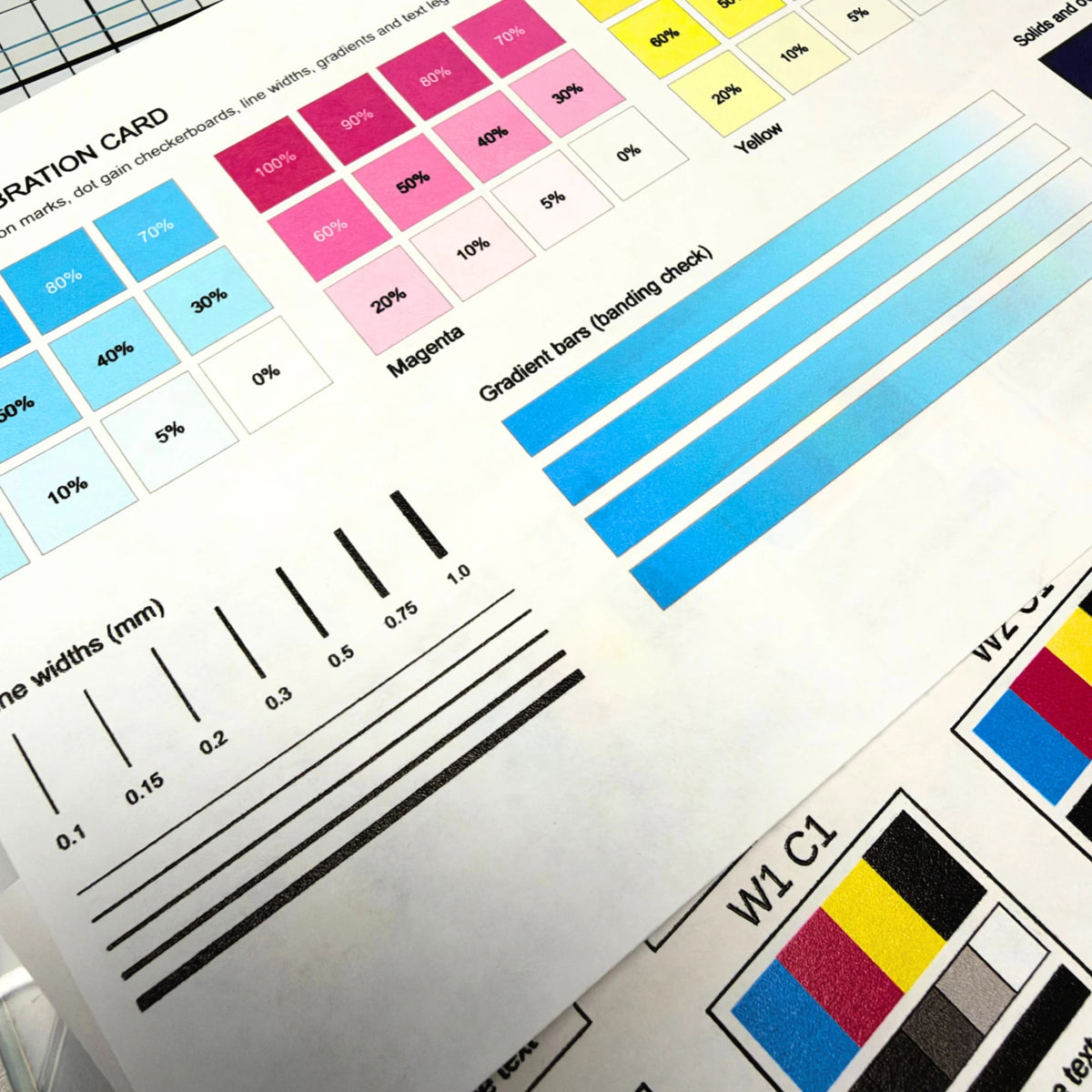
The UV Printer Test Grid is a ready-to-print test file for dialing in your UV printer settings. Print one sheet and compare white ink layers, color layers, varnish, and texture side by side, so you know exactly which setting to use before you start a real project. It also comes with a full UV Printer Calibration Card for checking ink density, alignment, banding, fine lines, and small text.
What you get
-
UV Printer Test Grid: 20 labeled test swatches, each with CMYK color blocks, a gray ramp, a solid black bar, and a fine-text line:
- W + C swatches (15): every combination of 0, 1, 2, 3, or 5 layers of white ink (W0 to W5) with 1, 2, or 3 layers of color (C1 to C3)
- V swatches (2): 1 or 2 layers of varnish (V1, V2)
- T swatches (3): texture at three thicknesses, from thin to thick (T.03, T.06, T.10)
- UV Printer Calibration Card: cyan, magenta, yellow, and black ramps from 100% down to 0%, registration marks, checkerboards, line widths from 0.1 to 1.0 mm, gradient bars for banding, overprint solids, rich black, reversed text, small shapes, and text from 30 pt down to 5 pt (sized to fit a 330 x 122 mm bed)
- File types: SVG, PNG, and JPG of the test grid, plus ready-made xTool Studio (.xs) and xTool Creative Space (.xcs) project files, and the calibration card as an SVG
- Delivery: Instant download as one zip file, nothing ships
- No watermark on the downloaded files
Software & machine compatibility
- xTool Studio and xTool Creative Space (open the .xs or .xcs file and print)
- eufyMake Studio and other UV printer software that accepts SVG, PNG, or JPG
- Any design program that opens SVG files (Inkscape, Illustrator, Affinity, and more) if you want to resize or rearrange the swatches
What you'll need to make it
- A UV printer
- A flat test blank, ideally the same material you plan to print on (acrylic, wood, tile, leather, metal, and so on)
- A computer to unzip the file and load it into your printer software
Project ideas
- Find the right number of white and color layers when you first set up a new UV printer
- Test a new material before you print a full batch on it
- Check for banding, clogged nozzles, or misalignment when prints start looking off
- Keep a printed reference card next to your machine so you can pick settings at a glance
- Compare varnish layers and texture thicknesses for glossy or raised effects
Frequently asked questions
Which file do I open?
If you have an xTool UV printer, open the .xs file in xTool Studio or the .xcs file in xTool Creative Space. For any other UV printer, use the SVG (best quality) or the PNG.
What do the labels under each swatch mean?
W is white ink and C is color, and the number after each letter is how many layers were printed. So W2 C3 means 2 layers of white under 3 layers of color. V is varnish, with the number of varnish layers (V1, V2). T is texture, and the number is how thick the texture is (T.03 is the thinnest, T.10 is the thickest). Find the swatch you like best on your material, and you have your settings.
What size is the calibration card?
The calibration card is built to fit a 330 x 122 mm print bed. Print it at 100% scale so the line widths and text sizes stay accurate. It is meant to be printed in color only, with no white underbase, on a white or light-colored blank.
Can I resize the files?
Yes. The SVG files scale cleanly to any size, so you can shrink the grid to fit a smaller blank or test just a few swatches at a time.
What's the license?
Personal use only. You can use these files to test and calibrate your own printer. You may NOT resell the files or share them with others.
Browse all digital downloads.
Share