

Easter Bunny Card & Envelope SVG File | Digital Download | For Cricut, Silhouette Or Any Craft Cutting Machine
Easter Bunny Card & Envelope SVG File | Digital Download | For Cricut, Silhouette Or Any Craft Cutting Machine
Couldn't load pickup availability
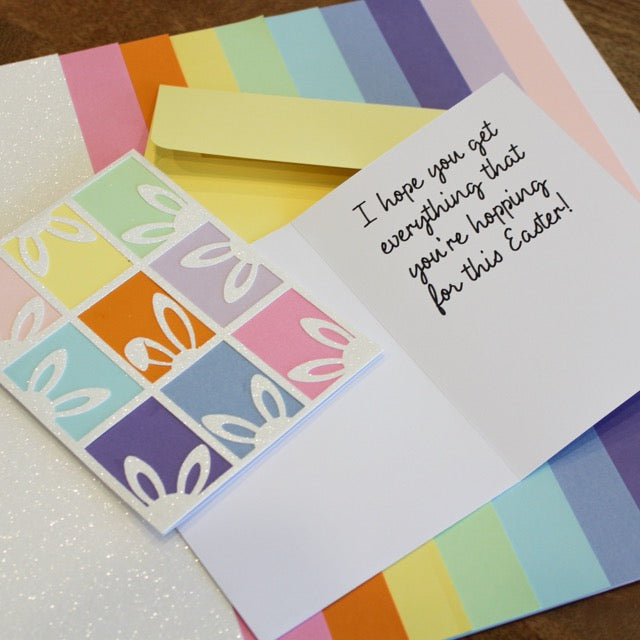
The Easter Bunny Card & Envelope SVG is a 3D paper craft cut file that turns flat cardstock into a charming bunny-themed greeting card with a coordinating envelope. Cut, score, fold, and assemble — and you've got a stationery-quality Easter card that looks far harder to make than it actually is.
What you get
- File type: SVG (with cut and score lines pre-set)
- Included: The bunny-themed card design + matching envelope template
- Delivery: Instant download — files available immediately after purchase, no shipping required
- No watermark on the downloaded files
Software & machine compatibility
- Cricut Design Space (Cricut Joy, Explore, Maker — all sizes)
- Silhouette Studio (Cameo, Portrait)
- Glowforge App, xTool Creative Space
- Brother ScanNCut, Inkscape (free), Adobe Illustrator, and any other vector/cutting software
What you'll need to make it
- Smooth solid-core cardstock in your chosen colors (light pink, white, ivory work especially well for Easter)
- A scoring stylus or scoring tool for clean folds
- Adhesive (foam tape, craft glue, or double-sided tape)
- Optional: shed-free glitter cardstock for accent layers
Project ideas
- Easter cards for kids, grandparents, and friends
- Easter basket place cards or name tags
- "Hop to it" classroom valentines (works year-round, not just Easter)
- Spring-themed greeting cards for any soft pastel project
Frequently asked questions
What software opens an SVG file?
SVG files open in Cricut Design Space, Silhouette Studio, Glowforge App, xTool Creative Space, Brother ScanNCut Canvas Workspace, Adobe Illustrator, Inkscape (free), and any vector graphics software. Most cutting-machine software accepts SVG natively.
Can I resize the design?
Yes — SVG is a vector format, so you can resize the card to any size without losing quality. Note: resize the card and envelope together so the envelope still fits the card.
How do I score and fold the card?
The score lines come embedded in the SVG. After cutting, run a scoring stylus along each score line, then fold along the lines to create clean, crisp creases.
What weight cardstock should I use?
67–80 lb smooth solid-core is the sweet spot — heavy enough to hold its shape, light enough to fold without cracking. See our cardstock weight guide for details.
What's the license?
Personal use only. You can make Easter cards for your own family and friends. You may NOT resell the digital file, share it, or use it for commercial production (selling finished cards in volume).
Browse all digital downloads · Pair with our smooth solid-core cardstock.
Share